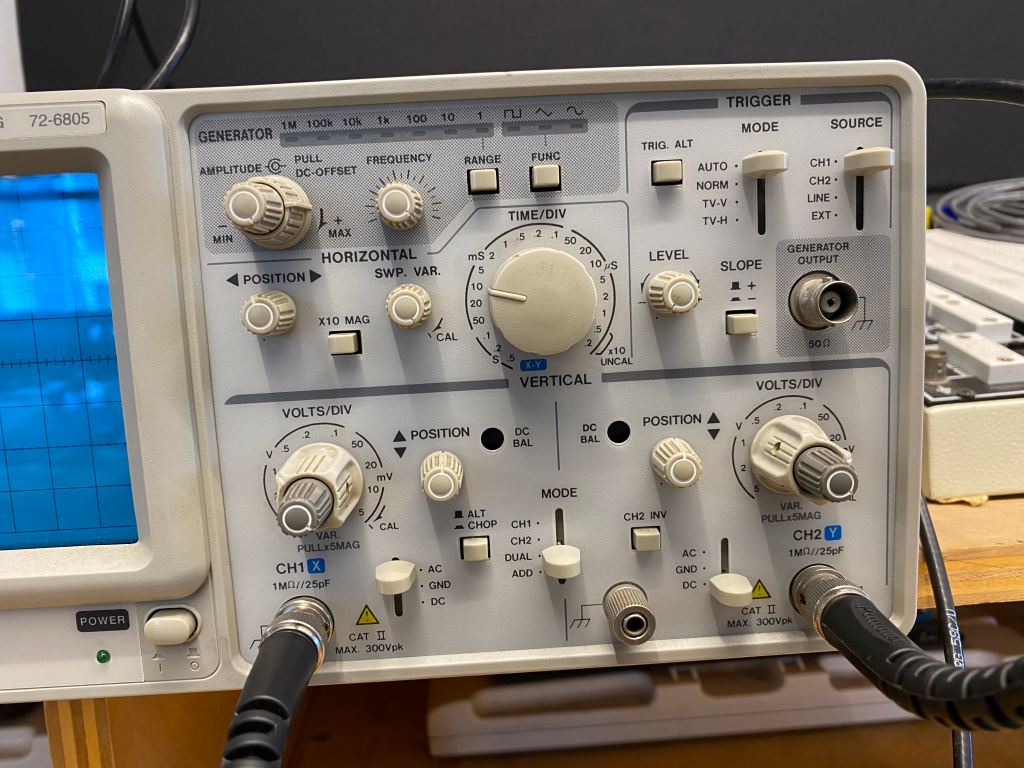
The View Mode will show what different channels look like. If you want to see both of the channels, use “dual” mode. The vertical Position knobs let you shift your waves up and down. You should center the waves in the middle. The Volts per div knob lets you expand or shrink your wave vertically, but you should turn smaller Volts Per Div knob all the way to the right until it clicks. The input mode switch lets you choose either the ground mode or the DC mode. Never use the AC mode. Set Trigger Source to Channel 1. The Trigger Mode to either Auto or TV-V. Time Per Div knobs let you decide how wide horizontally a wavelength is.
The X-axis shows time. The “time per div” demonstrates what the wave looks like, in one div, when it travels over a specific amount of time. The Y-axis shows the volts. The “volts per div” demonstrates how many volts are shown in one div.
The trigger mode (TV-V) allows you to set the wave still and make it easier to observe. The Trigger Source allows you to take one of the sources as a reference source and it syncronizes the other source with the reference source.
The wave of the second source matches up with the source one when it reaches its maximum amplitude. It becomes a flat line when it reaches its minimum amplitude. The range is 0% – 100% of the input wave.
 JERRY LIU ANALOG LAB REPORTS